Auditing XTable-Generated Iceberg Metadata in Firebolt
I pointed Firebolt at three Iceberg tables, ran the same March count against each, and got the same answer every time: 3,403,619 trips. Then I opened the query profiles and looked at how much data each read had to touch. Two of them scanned exactly the rows they returned. The third scanned nearly three times as much for the identical result.
All three counts were correct, but the amount of data scanned to produce them was not the same. The difference came down to one thing: whether the reader could tell which files were safe to skip, and a row count does not show you that.
March query, WHERE pickup_month = '2023-03', via Firebolt READ_ICEBERG

  Native Iceberg            scanned 3,403,619   returned 3,403,619
  Hudi -> XTable, good       scanned 3,403,619   returned 3,403,619
  Hudi -> XTable, bad        scanned 9,384,433   returned 3,403,619
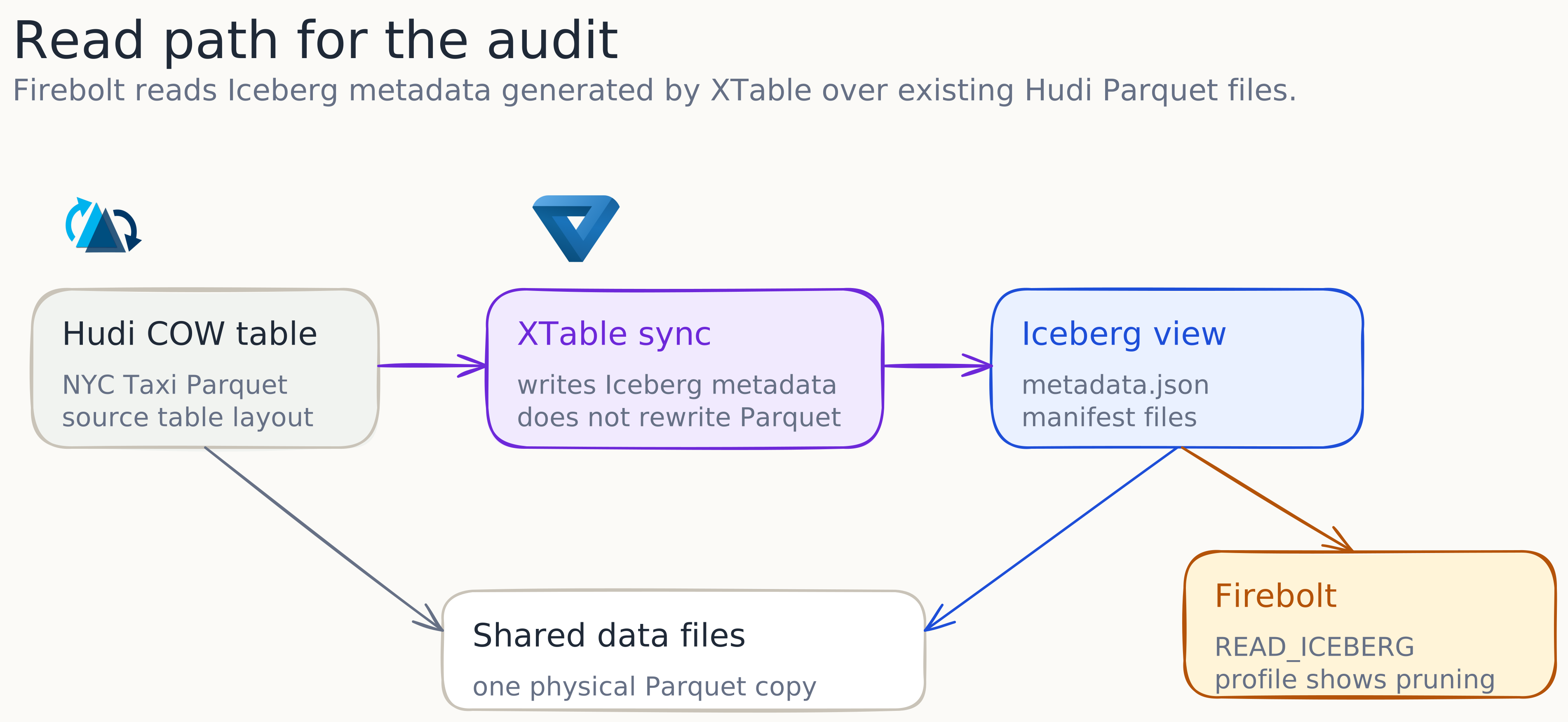
Two of those tables were never written by Iceberg. They are Hudi tables that Apache XTable translated into Iceberg metadata, and Firebolt read that generated metadata directly through READ_ICEBERG. This post checks whether that translation keeps the metadata a reader needs to prune files. I use the XTable source to see what it writes, and Firebolt query profiles to see what a reader does with it. It also shows where the translation cannot help, because the source files were laid out badly.
This is not an engine benchmark. Firebolt is the primary reader here because READ_ICEBERG can point straight at the generated Iceberg metadata and the query profile exposes files listed, files selected, rows scanned, and rows returned. Trino appears later only as a second reader over the same metadata, to check whether the scan pattern follows from the manifests rather than from one optimiser’s behaviour.
Reading XTable tables in Firebolt
Firebolt can read an external Iceberg table by pointing READ_ICEBERG at a metadata JSON file on S3. That is a clean way to query a lakehouse table without copying it in. The wrinkle is that a growing share of the Iceberg tables you will be handed were not authored by an Iceberg writer at all. They started life as Hudi or Delta, and a tool like XTable produced Iceberg metadata over the same Parquet files so that an Iceberg reader could open them.
This is exactly what XTable is for. Rewriting a large table from one open format to another is slow and expensive, so instead of moving the data, XTable reads the source table and writes a second set of table metadata beside it. One copy of the Parquet, several format readers over it. From Firebolt’s side, the table looks like any other Iceberg table.
The reason a Firebolt user should care about the internals is that almost all of Iceberg’s read speed comes from metadata, not from the data files. Iceberg keeps per-file statistics that let a reader discard files before opening them, and that file skipping is the difference between a query that reads one partition and a query that reads the whole table. So if the translation drops or widens those statistics, your READ_ICEBERG query still returns the right count while reading far more data than it needs to. A correctness check will not catch this, because the count is still right. Only the query profile shows the extra work, so that is what I checked.
What Firebolt needs to prune
To say “XTable preserved pruning” with any rigour, you have to be specific about what a reader prunes on. An Iceberg table is described by a small tree: a table metadata file points to a manifest list, and the manifest list points to manifest files. The manifests are where the useful detail lives, because for every data file in the table a manifest records two things that drive file skipping.
The first is the partition tuple, the value of each partition column for that file. If the table is partitioned by month and you filter on month, the reader keeps only the files whose partition value matches and never looks at the rest. The second is a set of per-column bounds, the minimum and maximum value of each column inside that file, stored as lower_bounds and upper_bounds. When you filter on a column that is not the partition key, the reader compares your predicate against those bounds and discards any file whose range cannot contain a match.
Firebolt’s query profile reports the outcome of both mechanisms in terms you can read directly: how many files were listed, how many were actually selected after pruning, how many rows were scanned, and how many rows came back. So “XTable preserved pruning” has a precise meaning: the generated Iceberg metadata reproduces both the partition spec and the per-file column bounds well enough that Firebolt selects the same files it would for a native Iceberg table. The rest of this post tests that, and it helps to first see how XTable produces the metadata.
The XTable metadata path
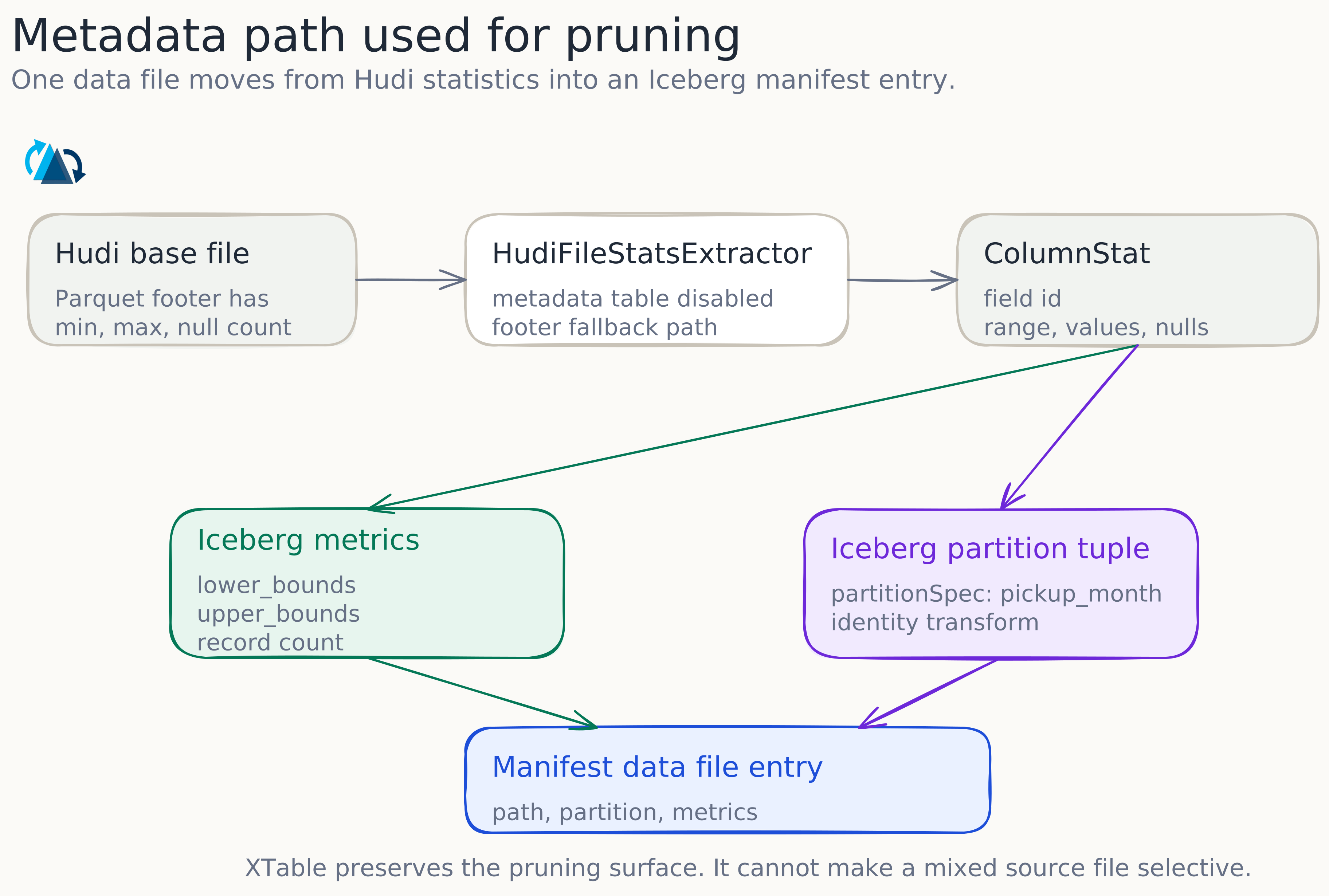
XTable does not copy Iceberg metadata from somewhere. It reads the Hudi table into an internal model and then writes fresh Iceberg metadata from that model, so the per-file statistics have to survive two hops: out of Hudi, and into Iceberg. The source makes both hops easy to follow.
On the Hudi side, HudiFileStatsExtractor decides where to read column statistics from. If the Hudi metadata table has a column-stats partition it reads from there, and if it does not, it falls back to reading the statistics straight out of each Parquet file footer:
boolean useMetadataTableColStats =
    metadataTable != null
        && metaClient.getTableConfig()
            .isMetadataPartitionAvailable(MetadataPartitionType.COLUMN_STATS);
if (!useMetadataTableColStats) {
  return computeColumnStatsFromParquetFooters(files, parquetNameFieldMap);
}
This detail matters for the experiment, because the tables here were written with hoodie.metadata.enable set to false. With no Hudi metadata table to consult, XTable takes the fallback branch and reads column ranges directly from the Parquet footers through Hudi’s ParquetUtils.readRangeFromParquetMetadata. Either path lands in the same internal ColumnStat, which carries the field, the value count, the null count, the size, and a Range holding the minimum and maximum.
On the Iceberg side, IcebergColumnStatsConverter turns each ColumnStat into an Iceberg Metrics object, and this is the exact point where a file’s bounds become the bytes a reader will later prune on:
if (columnStats.getRange().getMinValue() != null) {
  lowerBounds.put(
      fieldId, Conversions.toByteBuffer(fieldType, columnStats.getRange().getMinValue()));
}
if (columnStats.getRange().getMaxValue() != null) {
  upperBounds.put(
      fieldId, Conversions.toByteBuffer(fieldType, columnStats.getRange().getMaxValue()));
}
The partition side is handled separately. The partitionSpec: pickup_month:VALUE line in the XTable config is a VALUE transform, and IcebergPartitionSpecExtractor maps that to an Iceberg identity partition, so pickup_month:VALUE becomes identity(pickup_month) in the generated spec:
case VALUE:
  partitionSpecBuilder.identity(fieldPath);
  break;
Finally, IcebergDataFileUpdatesSync builds each Iceberg data file entry and attaches both levers at once, the column metrics through withMetrics and the partition tuple through withPartition:
DataFiles.Builder builder =
    DataFiles.builder(partitionSpec)
        .withPath(dataFile.getPhysicalPath())
        .withFileSizeInBytes(dataFile.getFileSizeBytes())
        .withMetrics(
            columnStatsConverter.toIceberg(
                schema, dataFile.getRecordCount(), dataFile.getColumnStats()))
        .withFormat(convertFileFormat(dataFile.getFileFormat()));
if (partitionSpec.isPartitioned()) {
  builder.withPartition(
      partitionValueConverter.toIceberg(partitionSpec, schema, dataFile.getPartitionValues()));
}
So on paper the translation should preserve both things a Firebolt read prunes on. Reading the code tells you what is supposed to happen. It does not tell you whether the bounds that come out the other end are tight enough to skip files, and that depends on the data the stats describe. That is what the experiment measures.
Dataset and table layouts
The dataset is the NYC Yellow Taxi trip data, the public Parquet files for January, February and March 2023. After normalising the schema and keeping only trips with a pickup timestamp inside calendar year 2023, I was left with 9,384,433 rows, of which 3,403,619 fall in March. Normalisation also derived the pickup_month string that every table partitions or filters on, joining the year and a zero padded month:
year = pc.year(pickup_ts)
month = pc.month(pickup_ts)
cols["pickup_month"] = pc.binary_join_element_wise(
    pc.cast(year, pa.string()),
    pc.utf8_lpad(pc.cast(month, pa.string()), 2, "0"),
    "-",
)
There is one quirk that shows up later and is worth flagging now. The raw files are labelled January to March, but eighty-five trips carry pickup timestamps that fall in early April, and since the filter keeps anything inside 2023, those eighty-five rows stay. In a month-partitioned table they land in their own tiny 2023-04 file. It is a small reminder that the month in a filename is a label, not a guarantee about the rows inside.
From that single normalised dataset I built three tables and asked each of them the same WHERE pickup_month = '2023-03' question.
| Table | What the engine reads | Physical layout | Role |
|---|---|---|---|
| Native Iceberg | Iceberg, written by Iceberg | partitioned by pickup_month | baseline |
| Hudi good layout | Iceberg metadata over Hudi COW, via XTable | partitioned by pickup_month | the real test |
| Hudi bad layout | Iceberg metadata over Hudi COW, via XTable | all rows in layout_bucket=all | negative control |
The native Iceberg table is the baseline, the standard the translated tables have to match. The good Hudi table is the actual subject: same sensible month layout, but reached through Hudi and XTable rather than written by Iceberg. The third table is the one that makes the result mean something. It holds the same rows translated by the same tool, but written so that every file contains a mix of all the months, which is the negative control. Without it, a clean result would only prove that a month-partitioned table prunes well, a fact nobody disputes. With it, the only variable that changes between the two translated tables is the physical layout, so if one prunes and the other does not, the layout is provably the cause and I can say exactly where XTable’s responsibility ends.
Reproducing the setup
The pipeline is a sequence of small scripts, one per stage, so each step is easy to inspect and rerun on its own:
python scripts/03_write_native_iceberg.py
python scripts/04_write_hudi_good_layout.py
python scripts/05_write_hudi_bad_layout.py
bash   scripts/06_run_xtable_sync.sh configs/xtable_good_layout.yaml
bash   scripts/06_run_xtable_sync.sh configs/xtable_bad_layout.yaml
The good Hudi table is a COPY_ON_WRITE table partitioned by pickup_month. Before the write, the data is repartitioned by month and sorted within each partition, so each output file holds a single month and its pickup_month bounds come out tight:
df = df.repartition("pickup_month").sortWithinPartitions("tpep_pickup_datetime")

hudi_options = {
    "hoodie.table.name": "nyc_taxi_hudi",
    "hoodie.datasource.write.table.type": "COPY_ON_WRITE",
    "hoodie.datasource.write.operation": "bulk_insert",
    "hoodie.datasource.write.partitionpath.field": "pickup_month",
    "hoodie.datasource.write.hive_style_partitioning": "true",
    "hoodie.parquet.max.file.size": str(128 * 1024 * 1024),
    "hoodie.metadata.enable": "false",
}
The bad table throws that structure away on purpose. It is still Hudi COPY_ON_WRITE, but instead of partitioning by month it assigns every row the same constant partition value and reshuffles into four files with no regard for month:
bad_df = (
    df.withColumn("layout_bucket", lit("all"))
      .repartition(4)
)
The result is four Parquet files that each hold a roughly even slice of the whole dataset, January through April all mixed together. Same rows as the good table, same record count, arranged so that no file can be excluded for a month query.
XTable then runs over each Hudi table. The config states only the source format, the target, and the partition transform, and the two jobs differ by exactly one line, pickup_month:VALUE for the good table and layout_bucket:VALUE for the bad one:
sourceFormat: HUDI
targetFormats:
  - ICEBERG
datasets:
  -
    tableBasePath: s3a://xfactor-firebolt-bucket/xfactor/xtable/nyc_taxi_hudi
    tableName: nyc_taxi_hudi
    namespace: xfactor
    partitionSpec: pickup_month:VALUE
From XTable’s point of view the two runs are the same work, which is the point: the translation logic is held constant, and only the shape of the files underneath differs. For anyone reproducing this, the versions were Spark 3.4.2, Hudi 0.14.1, the Iceberg 1.9.2 Spark runtime, the XTable 0.2.0-SNAPSHOT bundled jar, and Trino 481 for the cross-check.
Reading the query profile
There is an easy mistake to make here. If I had only run the count and checked that it came back as 3,403,619, all three tables would have passed and I would have learned nothing. A correct count only tells you the reader found the right rows; it says nothing about how many extra rows it read to find them, and that is the number I cared about.
Firebolt is well suited to this because its query profile reports that work as files listed, files selected, rows scanned, and final rows, and because READ_ICEBERG can point straight at a metadata JSON file on S3. That let me read each table’s generated Iceberg metadata directly, the exact output of the experiment, rather than something loaded and re-derived first:
SELECT count(*)
FROM READ_ICEBERG(
  URL => 's3://xfactor-firebolt-bucket/xfactor/xtable/nyc_taxi_hudi/metadata/v3.metadata.json',
  AWS_ACCESS_KEY_ID => '<AWS_ACCESS_KEY_ID>',
  AWS_SECRET_ACCESS_KEY => '<AWS_SECRET_ACCESS_KEY>'
)
WHERE pickup_month = '2023-03';
Trino comes in as a second reader, and only as a second reader. The point was not to race two engines but to check that the scan behaviour is a property of the metadata rather than a quirk of one optimiser. Getting Trino to read the translated tables took a detour worth recording for anyone trying the same: my first attempt used a Nessie backed catalog, but Trino refused to register the tables because it does not support registerTable for Iceberg Nessie catalogs. The setup that worked used an Iceberg JDBC catalog backed by Postgres, where I created the catalog tables and then registered each XTable metadata file explicitly with register_table. That kind of detail never shows up in a results table, so I am noting it here.
Manifest evidence
Before the query results, it is worth looking at what XTable wrote into the manifests, because that is what the reader prunes on.
For the good layout the bounds came out exactly as a month-partitioned table should. Four files, one per month, each with its pickup_month minimum equal to its maximum, and the stray April file sitting there with its eighty-five rows:
| File month | Lower bound | Upper bound | Rows |
|---|---|---|---|
| 2023-01 | 2023-01 | 2023-01 | 3,066,726 |
| 2023-02 | 2023-02 | 2023-02 | 2,914,003 |
| 2023-03 | 2023-03 | 2023-03 | 3,403,619 |
| 2023-04 | 2023-04 | 2023-04 | 85 |
Only one of these four files has bounds that overlap March, and because pickup_month is also the identity partition column, the reader can isolate that single file by partition value or by column bounds. Either way it opens one file.
The bad layout is where it gets instructive. XTable recorded the bounds just as diligently, reading the same Parquet footers through the same code path, but the numbers describe very different files:
| Layout bucket | pickup_month lower | pickup_month upper | Rows |
|---|---|---|---|
| all | 2023-01 | 2023-04 | 2,346,107 |
| all | 2023-01 | 2023-04 | 2,346,108 |
| all | 2023-01 | 2023-04 | 2,346,109 |
| all | 2023-01 | 2023-04 | 2,346,109 |
Every file spans January to April because every file contains a slice of each month. The metadata is not wrong; it correctly describes badly arranged files. That is the catch. Since each file really might hold March rows, a March predicate overlaps all four bounds and the reader cannot rule any of them out. The partition column here is the constant layout_bucket=all, so it does not help either. XTable recorded the statistics in both cases. What the reader can skip was decided earlier, by how the rows were laid out before XTable ran.
Firebolt and Trino results
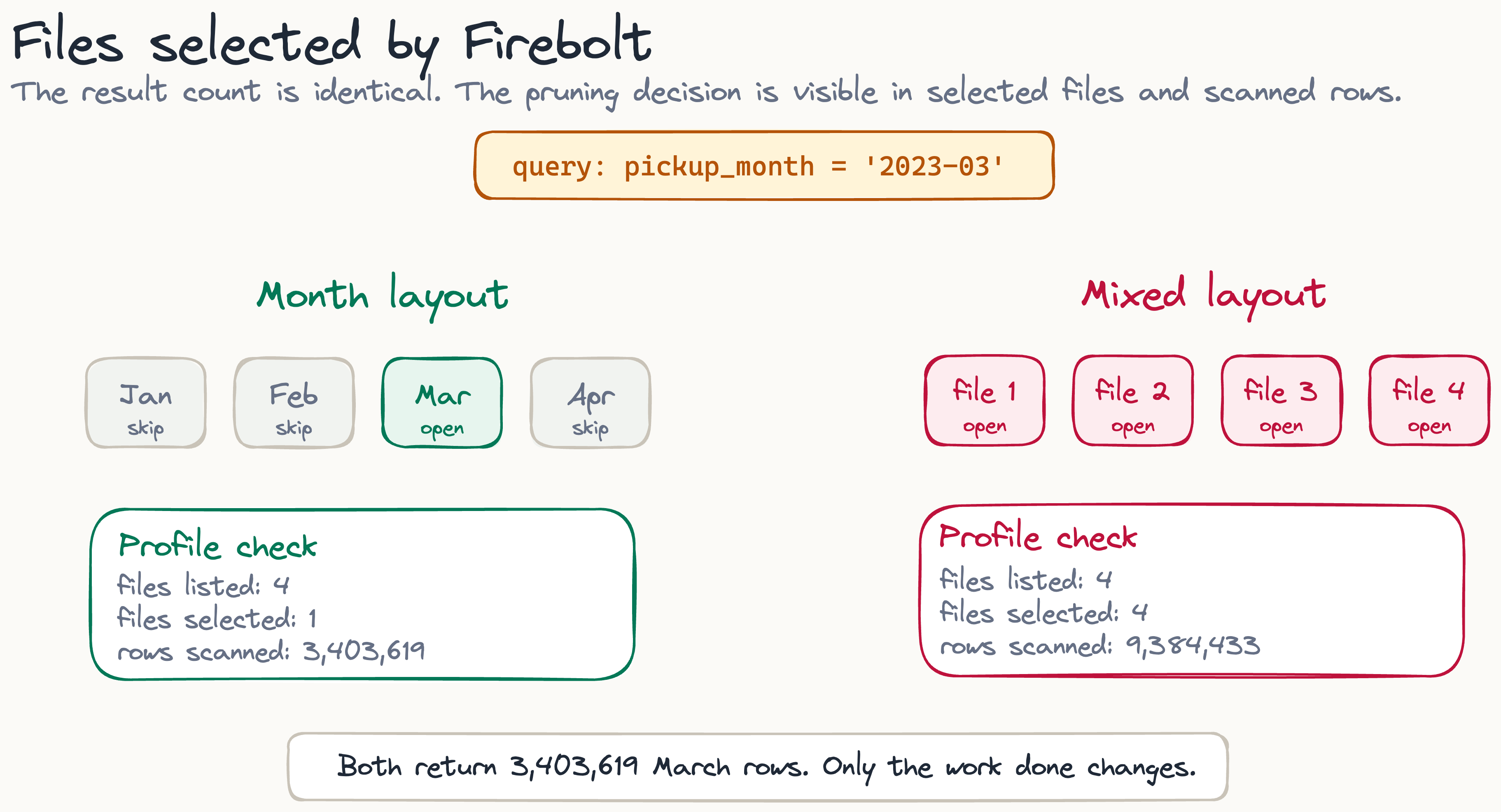
Run the March count against all three tables and each one returns the same number. The amount each table scanned to get there does not match.
| Engine | Table | Layout | Files listed | Files selected | Rows scanned | Final rows |
|---|---|---|---|---|---|---|
| Firebolt | Native Iceberg | good month | 4 | 1 | 3,403,619 | 3,403,619 |
| Firebolt | XTable Iceberg | good month | 4 | 1 | 3,403,619 | 3,403,619 |
| Firebolt | XTable Iceberg | bad mixed | 4 | 4 | 9,384,433 | 3,403,619 |
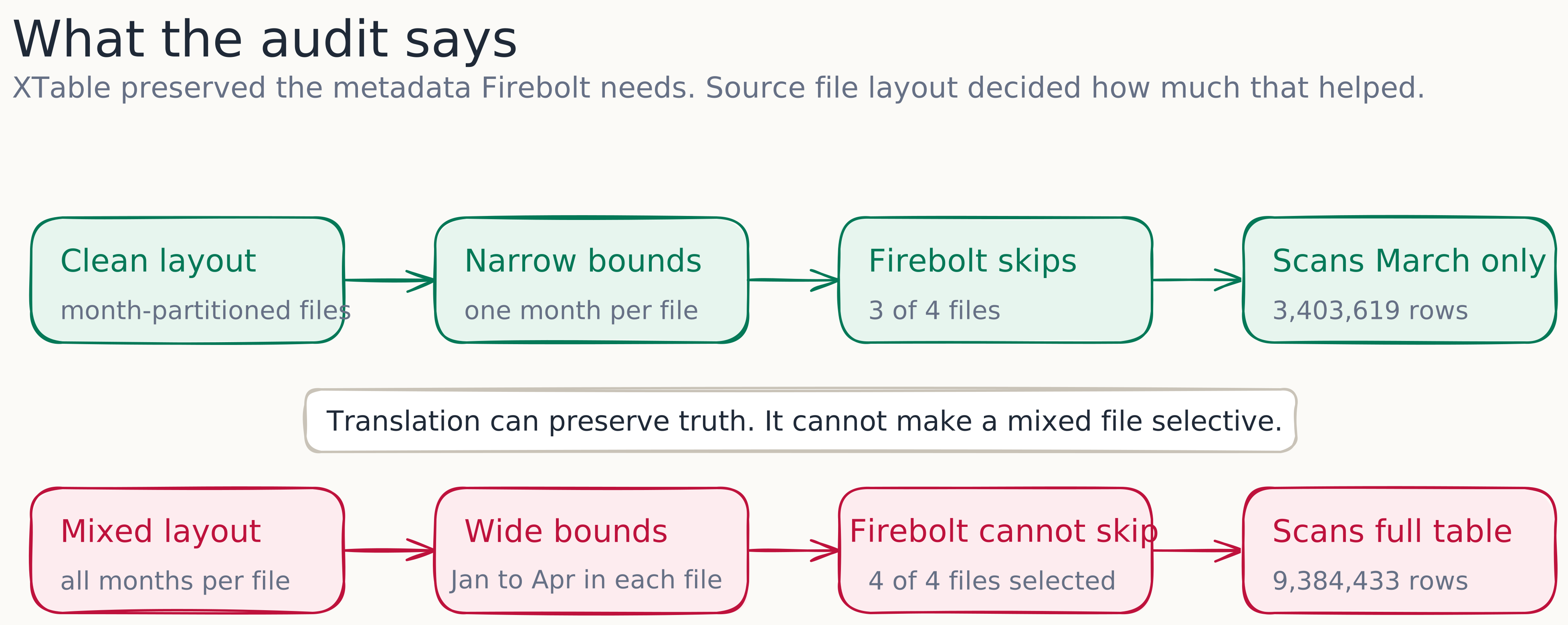
The native Iceberg table and the good XTable table are indistinguishable in the profile. Both list four files, select one, and scan 3,403,619 rows to return 3,403,619, so every row read is a row returned, which is as efficient as this query gets. This is the main result: for a Hudi COPY_ON_WRITE table with a clean layout, the Iceberg metadata XTable generated let Firebolt prune just as well as metadata Iceberg wrote for itself. The bad table returns the identical 3,403,619 rows but scans all 9,384,433 to get there, because it selected four files out of four.
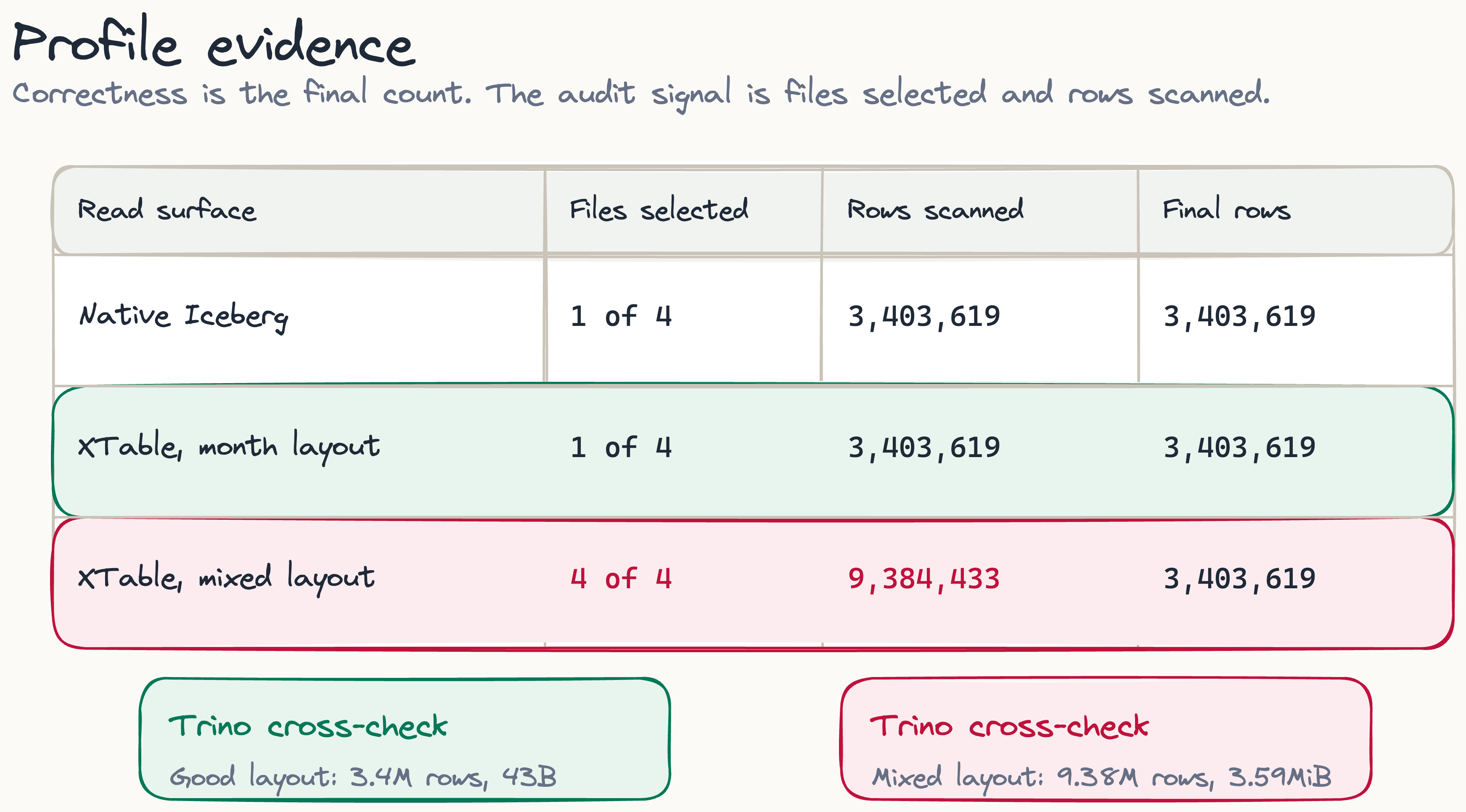
Trino, reading the same registered metadata through a different optimiser, split the same way:
Good XTable:  count(*) WHERE pickup_month = '2023-03'  ->  3,403,619   footer [3.4M rows, 43B]
Bad XTable:   count(*) WHERE pickup_month = '2023-03'  ->  3,403,619   footer [9.38M rows, 3.59MiB]
The scanned-row figures match Firebolt: roughly 3.4 million for the good layout and 9.38 million for the bad one. The byte figures in the footer are consistent with the same story, since on the month-partitioned table Trino can answer the count almost entirely from manifest metadata while the mixed layout forces it to read the column off disk. Two independent readers landing on the same file selection confirm this is a property of the metadata, not of any one engine.
Where the extra scan comes from
The bad-layout number is not a mark against XTable. XTable did the same job in both translated tables. It read the per-file statistics from the Parquet footers, encoded them into Iceberg lower_bounds and upper_bounds, carried the partition spec across as an identity transform, and attached both to every data file.
The difference is upstream. In the good layout, each March predicate had a narrow file range to hit, so Firebolt selected one file and scanned only the rows it returned. In the bad layout, every file spanned January to April, so the translated metadata could not say any file was safe to skip. Firebolt read all four because the manifest left it no choice.
For a Firebolt user, the point is this: XTable did not add a pruning penalty here. It preserved the pruning that the Hudi COPY_ON_WRITE files already allowed. If the source layout is clean, READ_ICEBERG gets the benefit. If the source layout is mixed, the same translation carries the wide bounds across faithfully, and the cost shows up in the profile.
Scope and next checks
This is a narrow test and it should be read narrowly. It covers Hudi COPY_ON_WRITE only, where the data lives in base Parquet files that carry footer statistics. Merge-On-Read keeps part of its data in delta logs, and translating those is a different problem I have not tested here. It is also not a benchmark, and nothing in it says Firebolt is faster than Trino or the reverse, since both engines were used to read metadata and report scan behaviour, not to be timed against each other. It is a single predicate on a single dataset, so it shows that XTable preserved the pruning-relevant statistics in this case, not that it preserves every statistic in every case. And it makes no claim about Firebolt’s own acceleration structures, such as aggregating or primary indexes, because READ_ICEBERG is reading an external Iceberg table and only the standard Iceberg file bounds are in play.
The next audit I would run is on Hudi Merge-On-Read, because delta logs change the problem. For COPY_ON_WRITE tables like this one, the check is simple: look at the generated manifests for lower_bounds and upper_bounds, run a selective query in Firebolt, and compare files selected against files listed. The count only tells you the answer is right; to know whether the table is cheap to read, look at how many files it selected.
The code, configs, and evidence are on GitHub: github.com/Pavan-249/xfactor-firebolt.