Testing MotherDuck for Concurrent FHIR Analytics over S3 Parquet
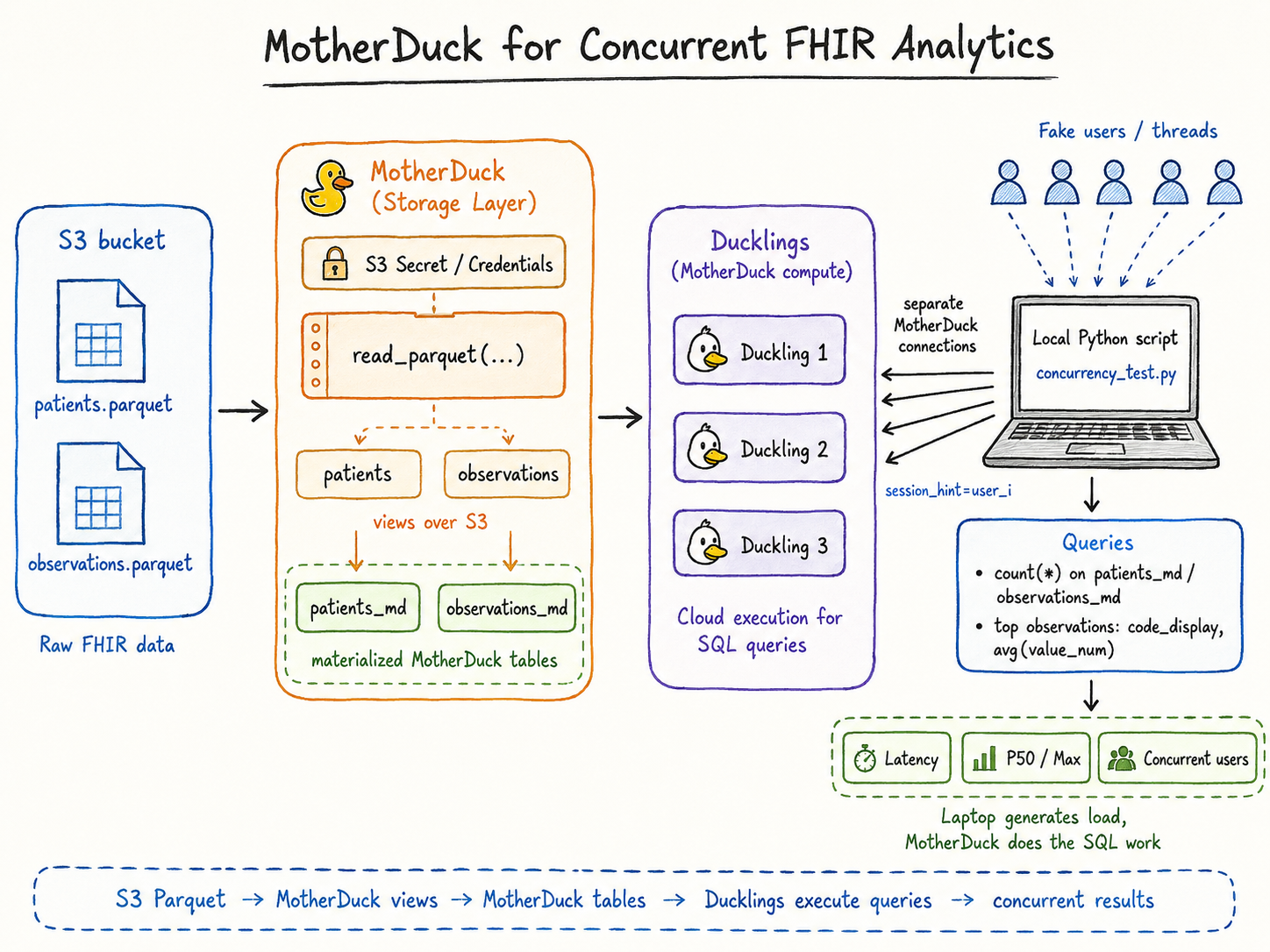
I had two FHIR-style datasets stored as Parquet files in S3:
patients.parquetobservations.parquet
The goal was simple: can I go from raw healthcare Parquet files in S3 to useful SQL analytics, and then simulate multiple dashboard users querying the same data concurrently?
Setup
I first created MotherDuck views directly over the S3 Parquet files:
CREATE OR REPLACE VIEW patients AS
SELECT *
FROM read_parquet('s3://fhir-firebolt-demo/patients.parquet');

CREATE OR REPLACE VIEW observations AS
SELECT *
FROM read_parquet('s3://fhir-firebolt-demo/observations.parquet');
This let me query the raw S3 data without building a separate ingestion pipeline.
For repeated analytics, I then materialized the views into MotherDuck tables:
CREATE OR REPLACE TABLE patients_md AS
SELECT * FROM patients;

CREATE OR REPLACE TABLE observations_md AS
SELECT * FROM observations;
Basic Analytics
The first query was just a sanity check on dataset size:
SELECT 'patients_md' AS table_name, count(*) AS rows FROM patients_md
UNION ALL
SELECT 'observations_md' AS table_name, count(*) AS rows FROM observations_md;
Then I ran a dashboard-style clinical observation summary:
SELECT
  code_display,
  category,
  count(*) AS observation_count,
  round(avg(value_num), 2) AS avg_value,
  min(value_num) AS min_value,
  max(value_num) AS max_value,
  any_value(unit) AS unit
FROM observations_md
WHERE value_num IS NOT NULL
GROUP BY code_display, category
ORDER BY observation_count DESC
LIMIT 15;
This gives a quick summary of common observations, categories, average values, and units.
Simulating Concurrent Users
To test concurrency, I used a local Python script as a load generator. Each thread acted like one dashboard user:
- Open a separate MotherDuck connection
- Run one dashboard-style SQL query
- Close the connection
- Record latency
The laptop was only generating concurrent requests. The SQL execution happened in MotherDuck.
Sample result:
Simulated users: 5
Average latency: 56.77s
P50 latency: 57.47s
Max latency: 57.47s

Simulated users: 20
Average latency: 23.73s
P50 latency: 30.90s
Max latency: 37.37s
The first run likely included cold-start or cache warm-up behavior. The second run gives a better view of warmed concurrent dashboard-style queries.
Takeaway
The useful pattern here is:
S3 Parquet -> MotherDuck views -> MotherDuck tables -> dashboard SQL -> concurrent user simulation
Local DuckDB is great for exploration. MotherDuck becomes useful when the same data needs to support repeated analytics, dashboards, and multiple users.
The next thing I would like to understand better is when to keep querying raw S3 Parquet directly versus when to materialize into MotherDuck tables, and how to size read-scaling Ducklings for concurrent dashboard workloads.